MCP as Serverless architecture
TL:DR Lambda and API Gateway MCP server with CDK. Focused on Enterprise architecture.
Setting the scene:
MCP is fast becoming the new standard for communications between machines and Generative AI applications. MCP was introduced in Nov 2024 by Anthropic as a standard for communications, between LLM’s and ‘Tools’ for LLM applications. They can help extend the binary world of tech to the probabilist world of GenAI, making it more deterministic than ever before
In April AWS put their weight behind MCP, with a library released from the AWSLabs Github repo with a series of MCP servers for AWS services. Here is the repo:
GitHub - awslabs/mcp: AWS MCP Servers - helping you get the most out of AWS, wherever you use MCP.
I caught this announcement with the release of the Serverless tools on 29th May.
Announcing new Model Context Protocol (MCP) Servers for AWS Serverless and Containers - AWS
I thought this was cool, a way of building AWS services with Natural language to add to their existing code options. I am not sure its viability yet (vs SDK for example) as I have not tested all the libraries yet, but it looks like this may be a big step forward for the adoption of MCP as a tool communication protocol.
In the list of AWS MCP servers one that caught my eye, was a MCP lambda handler. When I first saw this I thought this was the part of the library that everyone would be talking about, the ability to make 100% serverless MCP servers in Python. Most of the other medium articles and industry use cases I have seen seem to be focused on FastAPI/FastMCP servers running on Fargate.
Building an MCP server as an API developer
This would require a long running ‘serverless’ process rather than a truly stateless short lived serverless solution like AWS Lambda.
Using a fairly common serverless pattern of API gateway, Lambda and Dynamo DB, you could create a low cost, highly scalable stateless MCP architecture for your LLM applications. The ease of also integrating existing patterns of authorisation for server access and HTTP standards, that are a complement to your existing API’s. Building a MCP server will now be cheaper and easier than ever.
In my role I focus more on enterprise architecture rather than individual IDE integrations or personal MCP servers, so this solution is far more focused on how it might fit within the enterprise landscape, although Iam sure you could adapt it for your VSCode or Claude Desktop IDE.
How is this new
MCP was first released using two data communication methods, STDIO and SSE. These were designed to run on your computer on localhost, or using Server Side Events (More specialised than HTTP). There has also been numerous concerns about security of MCP, especially when run locally from a non-official server.
The "S" in MCP Stands for Security
The main differences with Streamable HTTP and SSE, is that the HTTP connection is a single two way request where SSE is a persistent connection. With the lambda function integration it is a very short lived connection, utilising JSON-RPC and a reduced attack surface. Allowing monitoring and security to be a lot simplier, than long running HTTP connection. IAM permissions can also be used to ensure least privileges, which will improve the overall application security.
I am hoping this technology, will help improve the overall security posture of MCP.
High level design:
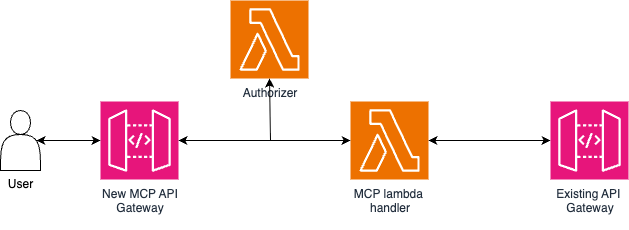
Design considerations:
- The design is to show how this may work in enterprise, rather than a best practice
- I kept it simple for the purpose of this article, you could consider 1 tool per lambda (Simplicity of Tools in application, api access controls and better api logging)
- The design was originally proposed to be a abstraction wrapper for existing API’s, that you would like to make available to an LLM application eg Agent, chatbot
- Uses the lowest cost serverless infrastructure, running a Fargate container 24/7 is technically serverless but seems to be less true to its name than a Lambda based application
Things I am not going into in this article:
- What is MCP and how it works (Lots of articles you can go to about that)
- Adding a IDP or OAuth2 for Auth, I am using a hardcoded bearer token to simulate Auth (Fine for testing purposes, not for production)
- This is not a CDK deep dive, will just have the stack code shown. If you need to know more about CDK, there are lots of resources online for that
The code:
n.b, this is just the code blocked into their subsequent resources. If you copy it directly you will get a referenced before defined error. See the github repo for the actual implementation.
API Gateway:
import * as apigateway from 'aws-cdk-lib/aws-apigateway';

const api = new apigateway.RestApi(this, 'Api', {
      restApiName: 'McpServerRestApi',
      description: 'REST API for MCP Lambda',
    });

const gatewayAuthorizer = new apigateway.RequestAuthorizer(this, 'GatewayAuth', {
      handler: authLambda,
      identitySources: [apigateway.IdentitySource.header('Authorization')],
    });

const addTwoNumers = api.root.addResource('add_two_numbers').addResource('mcp');
    addTwoNumers.addMethod('POST', new apigateway.LambdaIntegration(addTwoNumbersLambda), {
      authorizer: gatewayAuthorizer,
    });

const apiWrapper = api.root.addResource('api_wrapper').addResource('mcp')
    apiWrapper.addMethod('POST', new apigateway.LambdaIntegration(apiWrapperLambda), {
      authorizer: gatewayAuthorizer,
    });
- Adding a simple RestApi from apigateway
- Using a lambda authorizer with the Authorization header
- Added two routes, one for each lambda MCP server (note the addResource(mcp) is to keep to the http standard for MCP endpoints)
Lambda functions:
const authLambda = new lambda.Function(this, 'AuthLambda', {
      runtime: lambda.Runtime.PYTHON_3_13,
      handler: 'main.lambda_handler',
      code: lambda.Code.fromAsset(path.join(__dirname, '../', 'lambda/auth')),
      architecture: lambda.Architecture.ARM_64,
      environment: {
        DUMMY_BEARER_TOKEN: dummyBearerToken
     }});


const addTwoNumbersLambda = new lambda.DockerImageFunction(this, 'AddTwoNumbersMcpServer', {
      code: lambda.DockerImageCode.fromImageAsset(path.join(__dirname, '../','lambda/add_two_numbers')),
      architecture: lambda.Architecture.ARM_64,
      timeout: cdk.Duration.seconds(60),
      environment: {
        SESSION_TABLE_NAME: sessionTable.tableName,
      },
    });

const apiWrapperLambda = new lambda.DockerImageFunction(this, 'ApiWrapperMcpServer', {
      code: lambda.DockerImageCode.fromImageAsset(path.join(__dirname, '../','lambda/api_wrapper')),
      architecture: lambda.Architecture.ARM_64,
      timeout: cdk.Duration.seconds(60),
       environment: {
        SESSION_TABLE_NAME: sessionTable.tableName,
      },
    });
- I like Docker lambdas for python, simplifies the development a lot
- Using ARM architecture, as its a bit cheaper and faster
- Auth lambda is just a normal lambda function in CDK code, as there is no libraries that are needed for that function
Dynamo table:
const sessionTable = new dynamodb.Table(this, 'SessionTable', {
      partitionKey: { name: 'session_id', type: dynamodb.AttributeType.STRING },
      timeToLiveAttribute: 'expires_at',
      billingMode: dynamodb.BillingMode.PAY_PER_REQUEST,
      tableName: 'mcp_session_log',
      removalPolicy: cdk.RemovalPolicy.DESTROY,
    });
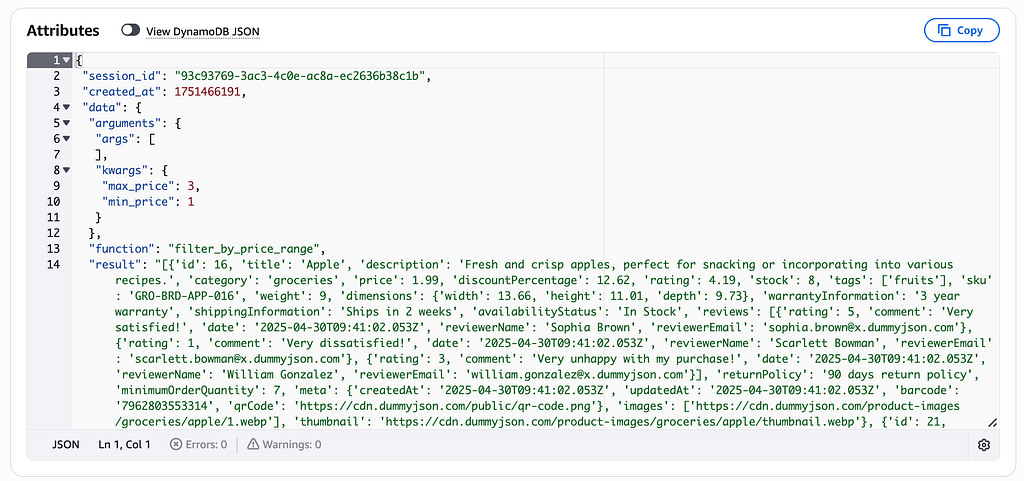
- Simple dynamo table with session_id as the partitionKey, for storing interactions (Has ttl to limit data amounts)
Lambda logic:
Authoriser:
import os

def lambda_handler(event, context):
    try:
        token = event['headers'].get('Authorization')
        if not token:
            raise ValueError('Authorization header missing')

        if token == f'Bearer {os.getenv('DUMMY_BEARER_TOKEN')}':
            return {
                "principalId": "test-user",
                "policyDocument": {
                    "Version": "2012-10-17",
                    "Statement": [
                        {
                            "Action": "execute-api:Invoke",
                            "Effect": "Allow",
                            "Resource": event['methodArn'],
                        },
                    ],
                },
            }
        else:
            raise ValueError('Invalid token')

    except Exception as error:
        print(f"Authorization error: {error}")
        return {
            "principalId": "unauthorized",
            "policyDocument": {
                "Version": "2012-10-17",
                "Statement": [
                    {
                        "Action": "execute-api:Invoke",
                        "Effect": "Deny",
                        "Resource": event['methodArn'],
                    },
                ],
            },
        }
- Approves or denies the api request based on token
Add two numbers Lambda:
from awslabs.mcp_lambda_handler import MCPLambdaHandler
from awslabs.mcp_lambda_handler.session import DynamoDBSessionStore

import os
import functools


table_name = os.environ.get('SESSION_TABLE_NAME')

mcp = MCPLambdaHandler(
    name="mcp-lambda-server",
    version="1.0.0",
    session_store=DynamoDBSessionStore(table_name=table_name)
)

def session_logger(func):
    """Decorator to handle session logging and argument/result logging."""
    @functools.wraps(func)
    def wrapper(*args, **kwargs):
        session = mcp.get_session()
        if session:
            session.set('function', func.__name__)
            session.set('arguments', {'args': args, 'kwargs': kwargs})
            result = func(*args, **kwargs)
            session.set('result', str(result) if not isinstance(result, str) else result)
            mcp.set_session(session.raw())
        else:
            result = func(*args, **kwargs)
        return result
    return wrapper

@mcp.tool()
@session_logger
def add_two_numbers(a: int, b: int) -> int:
    """Add two numbers together."""
    return a + b

def lambda_handler(event, context):
    """AWS Lambda handler function."""
    return mcp.handle_request(event, context)
- Built a decorator for logging session info, complicates the code a bit but simplier to read on here
- This function uses the mcp lambda_session to execute the add_two_numbers, from within the lambda instead of a traditional handler func
API Wrapper:
table_name = os.environ.get('SESSION_TABLE_NAME')

mcp = MCPLambdaHandler(
    name="mcp-lambda-server",
    version="1.0.0",
    session_store=DynamoDBSessionStore(table_name=table_name)
)

def session_logger(func):
    """Decorator to handle session logging and argument/result logging."""
    @functools.wraps(func)
    def wrapper(*args, **kwargs):
        session = mcp.get_session()
        if session:
            session.set('function', func.__name__)
            session.set('arguments', {'args': args, 'kwargs': kwargs})
            result = func(*args, **kwargs)
            session.set('result', str(result) if not isinstance(result, str) else result)
            mcp.set_session(session.raw())
        else:
            result = func(*args, **kwargs)
        return result
    return wrapper

@mcp.tool()
@session_logger
def fetch_all_products() -> dict:
    """Fetch all products from the API."""
    response = requests.get("https://dummyjson.com/products")
    response.raise_for_status()
    return response.json()

@mcp.tool()
@session_logger
def filter_by_price_range(min_price: float, max_price: float) -> list:
    """Filter products by price range."""
    products = fetch_all_products()["products"]
    return [product for product in products if min_price <= product["price"] <= max_price]

@mcp.tool()
@session_logger
def filter_by_stock_availability(min_stock: int) -> list:
    """Filter products by minimum stock availability."""
    products = fetch_all_products()["products"]
    return [product for product in products if product["stock"] >= min_stock]

def lambda_handler(event, context):
    """AWS Lambda handler function."""
    return mcp.handle_request(event, context)
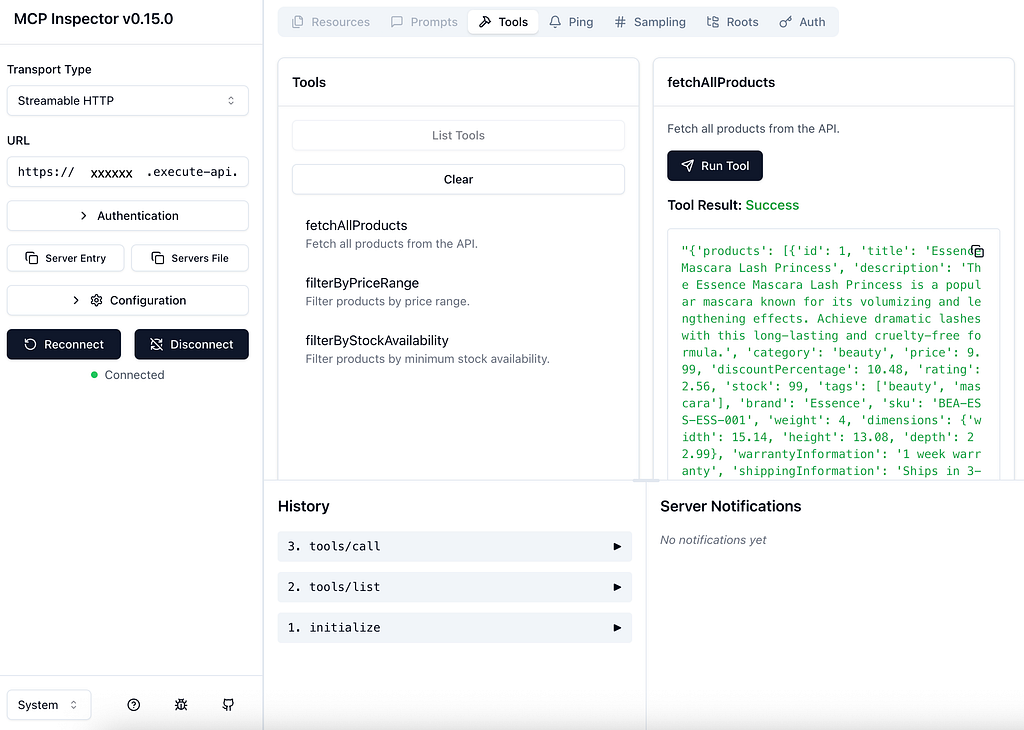
- Wrapper function for free online JSON api, just showing implicit api calls, with mcp (Filtering JSON in this case, rather than seperate api routes)
- Could also be written, to have multiple api routes
Dockerfile for Python Lambda:
FROM --platform=arm64 public.ecr.aws/lambda/python:3.13

COPY . ${LAMBDA_TASK_ROOT}

RUN pip install -r requirements.txt --target "${LAMBDA_TASK_ROOT}"

EXPOSE 8080

CMD ["main.lambda_handler"]
- Remove platform=arm64 if you want to build a x86 lambda, github runners are x86 so need to be specific with my CI/CD pipeline
Proof its working:
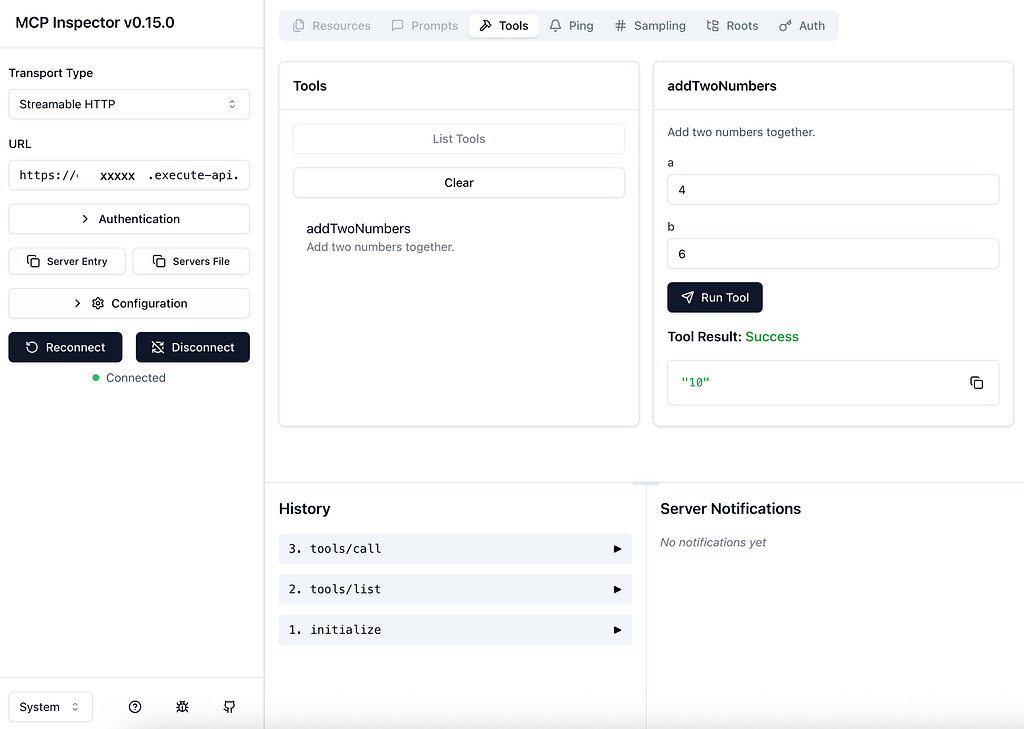
MCP Inspector
Anthropic released a cool MCP testing playground called MCP Inspector, this can be used to test the MCP server, seeing the requests and results.
Github repo:
GitHub - modelcontextprotocol/inspector: Visual testing tool for MCP servers
To run locally use the command
npx @modelcontextprotocol/inspector
What it looks like:
MCP Inspector:
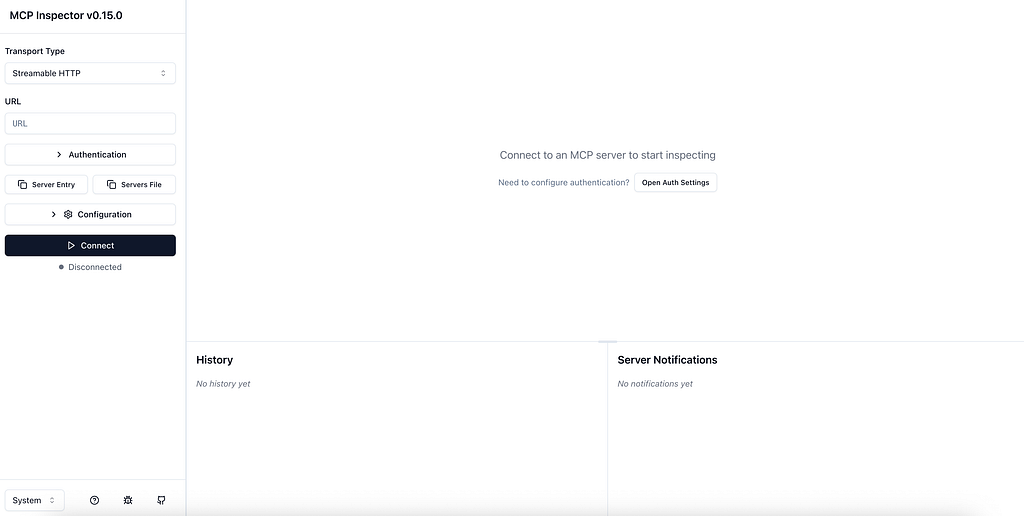
Add your URL to the URL field and also add in the mock bearer token, and you should be able to call the MCP server (Please note that the standard URL pattern for Streamable HTTP is /mcp, hence why i added it to the route, for consistency)
https://
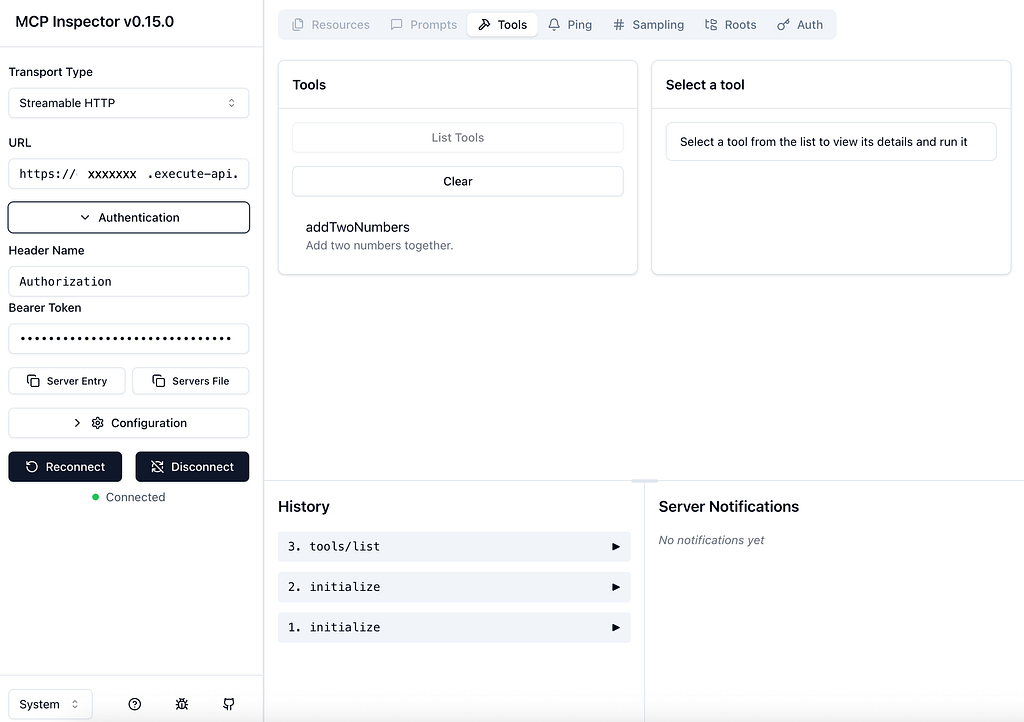
Results for add two numbers function:
The api wrapper function:
The lambda handler has a dynamo logging abstraction, so you can log requests for audit/testing.
Additional things worth noting:
- As this MCP lambda handler doesn't support streaming , I decided to use a REST API to keep it simple (Could consider WebSocket, if streaming becomes available)
- More work needs to be done about different auth styles (OIDC or OAuth2), how to implement user or application specific permissions?
- Something that i am finding as i play with MCP more. Its not bad to be more explicit in the MCP code, code is a binary world so why not use that to your advantage (See tools for API wrapper code). Set up the MCP server so that it has a lot of tools, that do something very specific, be explicit in the doc strings, so the LLM knows what tool to call. I think its better to have 15 tools, that do 15 specific thing, rather than a single tool and you rely on the LLM to modify/filter the data.
Things i am still working on:
- Enterprise level Authorisation Authentication (How to limit tool routes to users/process)
- Best practices for tools visibility, should you do a single tool per Lambda? or maybe use OAuth scopes to limit route visibility? API Gateway middle wear to modify the tool list based on user/application permissions?
- Exploring AWS’s new MCP server pattern they released
This code is available on my Github
GitHub - BradWebb101/serverless-mcp-servers
Reach out on Linkedin https://www.linkedin.com/in/brad-webb-101/