
Agent Patterns (Without the Hype) w/ Strands
Everyone is building “agents”. Most designs could boil down to 4 patterns: linear flows, graph/state machines, supervisors, and routers. With a few other patterns and exceptions, but they’re usually just variations of these.
Pick the right one and life is good. Pick the wrong one and you’ve built a very expensive random output generator.
Intro
With every startup/company/SaaS suddenly becoming “AI-native”, all workflows/applications/chatbots are now an “Agent”.
In reality, most of these systems aren’t new. We’ve just taken old patterns, sprinkled an LLM on top, and given them cooler names. The OG computer processes, were hipsters of the AI world without even knowing it.
GenAI is like a super smart sounding toddler, that needs structure and guidance to get it to perform. Think less “autonomous intelligence” and more “structured ways to design options to have control over the flow”.
Here are the four patterns I have personally used, that are a good starting point to your Agent Building journey (With a few additional ideas sprinkled on top)
1. Linear Flow — The “My first AI flow” Pattern
This is the one everyone starts with. It is simple and can do most jobs.
You take an input, pass it through a few steps, and hope nothing weird happens. A strict parent, not allowing decision making. Just do as I say.
Example of a Linear Flow

Where it works:
- Summarise → clean → format
- Extract → transform → store
- Anything boring and predictable
Where it doesn’t:
- The moment something doesn’t fit the happy path/expected outputs
- No real decision-making
- “Just add one more step” turns into spaghetti code surprisingly fast
This is your start pattern. Don’t overthink it. Implement it until it doesn’t work anymore.
Example code in Strands:
from strands import Agent

extractor = Agent(
    name="extractor",
    system_prompt=(
        "Extract the key requirements from the user's input. "
        "Return short bullet points only."
    ),
)

analyst = Agent(
    name="analyst",
    system_prompt=(
        "Take the extracted requirements and turn them into a concise plan. "
        "Be practical and specific."
    ),
)

writer = Agent(
    name="writer",
    system_prompt=(
        "Turn the plan into a short markdown response with a title and bullets."
    ),
)


def run_linear_flow(user_input: str) -> str:
    step_1 = str(extractor(user_input))
    step_2 = str(analyst(step_1))
    step_3 = str(writer(step_2))
    return step_3


if __name__ == "__main__":
    result = run_linear_flow(
        "Build a small internal tool for tracking delivery exceptions and reporting trends."
    )
    print(result)
2. Graph / State Pattern — When Reality Gets Messy
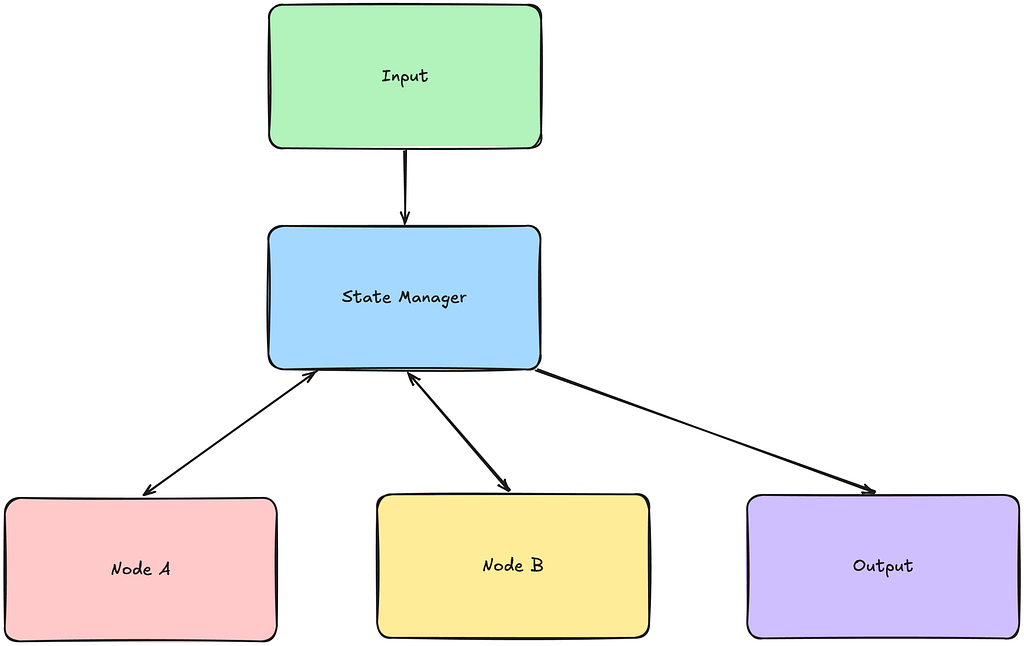
At some point, linear flows stop working because the world isn’t linear. Decision gates need to be written, different flows for different use cases are required.
Now you need branching, retries, maybe even loops. Welcome to graphs. This is a more complex flow, that is essentially a DAG (Directed Acyclical Graph) used in Data Pipelines regually. It is still moving forward in a process similar to a linear flow, just allows for more variability.
Instead of a fixed path, the agent moves based on state (What happened before, dictates the next step).
Example of a Graph/State Pattern
Where it works:
- Multi-step reasoning
- Conditional flows (“if this, then that”)
- Anything that might need a retry or fallback (“Didn’t work exactly as you thought, first time”)
Where it doesn’t:
- State management becomes your new hobby
- Debugging is… less fun
- Diagrams start to look like Pepe Silvia
This is where “agent systems” start to feel like systems again. Adding thinking, decisions and variable outputs based on inputs. This the the improved pattern if you want some autonomy but still giving guidance.
Example code in Strands:
from strands import Agent
from strands.multiagent import GraphBuilder

researcher = Agent(
    name="researcher",
    system_prompt=(
        "Read the request and produce a short research brief with constraints, "
        "risks, and assumptions."
    ),
)

planner = Agent(
    name="planner",
    system_prompt=(
        "Turn the input into an implementation plan with ordered steps."
    ),
)

reviewer = Agent(
    name="reviewer",
    system_prompt=(
        "Review the plan. Point out gaps, bad assumptions, and missing edge cases."
    ),
)

finalizer = Agent(
    name="finalizer",
    system_prompt=(
        "Combine all previous outputs into one final answer. "
        "Keep it compact and clear."
    ),
)

builder = GraphBuilder()
builder.add_node(researcher, "research")
builder.add_node(planner, "plan")
builder.add_node(reviewer, "review")
builder.add_node(finalizer, "final")

builder.add_edge("research", "plan")
builder.add_edge("plan", "review")
builder.add_edge("review", "final")

graph = builder.build()


if __name__ == "__main__":
    result = graph(
        "Design an AI assistant for triaging customer support emails."
    )
    print(result)
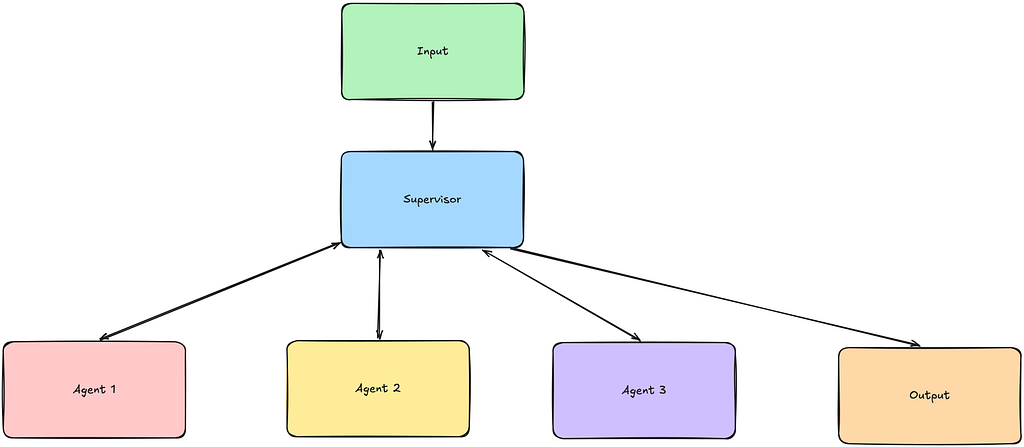
3. Supervisor Pattern — The Middle Manager
Now instead of one agent doing everything badly, you have multiple agents doing specific things… slightly less badly. A homage to organizational design, mirroring a hierarchy of delegated responsibilities.
Where it works:
- Research + summarisation + writing
- Multi-skill workflows
- Reusable components
Where it doesn’t:
- The supervisor can become a bottleneck
- More moving parts = more things to break
- Coordination overhead is real
You’ve basically reinvented a small company. Congrats.
from strands import Agent, tool


research_agent = Agent(
    name="research_agent",
    system_prompt=(
        "You are a research specialist. Return concise factual notes only."
    ),
)

architecture_agent = Agent(
    name="architecture_agent",
    system_prompt=(
        "You are a software architect. Return a practical design only."
    ),
)

writing_agent = Agent(
    name="writing_agent",
    system_prompt=(
        "You are a technical writer. Turn inputs into a punchy business-friendly summary."
    ),
)


@tool
def ask_research_agent(query: str) -> str:
    """Use this when you need background information, facts, or context."""
    return str(research_agent(query))


@tool
def ask_architecture_agent(query: str) -> str:
    """Use this when you need system design, architecture, or implementation structure."""
    return str(architecture_agent(query))


@tool
def ask_writing_agent(query: str) -> str:
    """Use this when you need a polished final summary or article-style output."""
    return str(writing_agent(query))


supervisor = Agent(
    name="supervisor",
    tools=[ask_research_agent, ask_architecture_agent, ask_writing_agent],
    system_prompt=(
        "You are a supervisor agent. "
        "Break the task down, delegate to the right specialist tools, "
        "and combine their outputs into one final answer."
    ),
)


if __name__ == "__main__":
    result = supervisor(
        "Create a short proposal for an internal knowledge assistant. "
        "I want context, a rough architecture, and a final executive summary."
    )
    print(result)
4. Routing Agent — The Bouncer
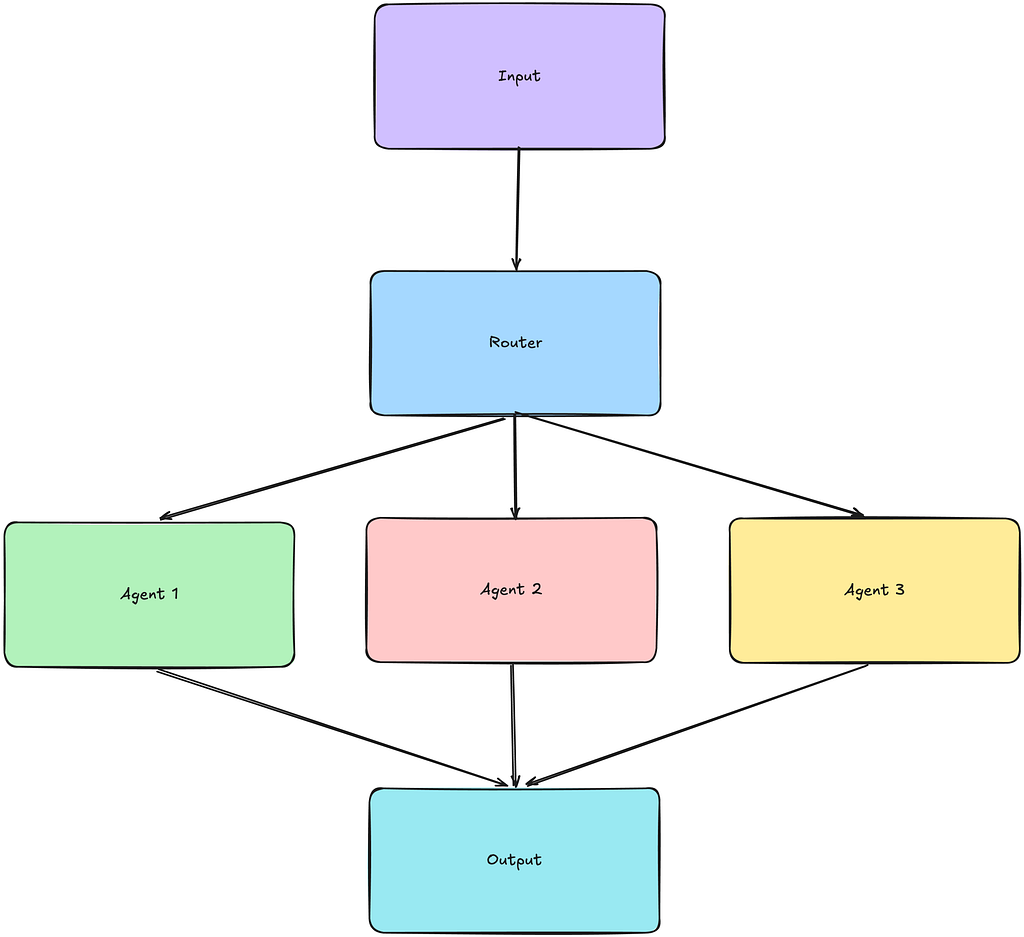
Sometimes you don’t need coordination. You just need to send things to the right place. Less make a decision, more just do it. It doesn’t need complex steps, just tick and flick.
Example of a Router Pattern
Where it works:
- Chatbots with multiple intents
- Tool selection (search vs calculate vs API)
- Keeping systems from becoming bloated
Where it doesnt’:
- If routing is wrong, everything is wrong
- Relies heavily on classification quality
- Easy to overcomplicate with “smart routing”
A good router saves you from building a bad supervisor.
from strands import Agent, tool


billing_handler = Agent(
    name="billing_handler",
    system_prompt="Handle billing questions only. Be direct and concise.",
)

tech_handler = Agent(
    name="tech_handler",
    system_prompt="Handle technical support questions only. Give practical steps.",
)

general_handler = Agent(
    name="general_handler",
    system_prompt="Handle general questions only. Keep responses short.",
)


@tool
def route_to_billing(message: str) -> str:
    """Use for invoices, payments, refunds, subscriptions, or charges."""
    return str(billing_handler(message))


@tool
def route_to_tech(message: str) -> str:
    """Use for bugs, errors, integrations, login issues, or system failures."""
    return str(tech_handler(message))


@tool
def route_to_general(message: str) -> str:
    """Use for everything else that does not fit billing or tech support."""
    return str(general_handler(message))


router = Agent(
    name="router",
    tools=[route_to_billing, route_to_tech, route_to_general],
    system_prompt=(
        "You are a routing agent. "
        "Classify the request and call exactly one route tool unless the user truly needs more."
    ),
)


if __name__ == "__main__":
    print(router("Why was my subscription charged twice this month?"))
    print(router("Our webhook integration returns a 500 error."))
    print(router("What does your service actually do?"))
Honorable Mentions (a.k.a. Variations in Disguise)
There are a few other “patterns” you’ll see floating around.
Most of them are just a remix of the four above. A slightly different flavour of Fanta.
Tool Calling/Skills Agent — The Default Setting
This gets talked about like it’s a pattern. It’s not. It’s just how most agents work.
Example of an Agent with a tool:

- what tool to call
- when to call it
- what to do next
If you’re building agents and not doing this, you’re probably fighting the framework.
This is usually sitting inside routers and supervisors anyway. Tools and Skills give agents a connection to the digital world, a bridge between deterministic and non-deterministic processes. Giving your agent a computer to work on, much like yourself.
from strands import Agent, tool


@tool
def get_skillset() -> str:
    """Return the candidate's core skills."""
    return "Python, AWS, serverless, APIs, event-driven systems, AI engineering."


@tool
def get_recent_projects() -> str:
    """Return a short list of recent projects."""
    return (
        "- MCP resume on Lambda invoke URL\n"
        "- Internal automation workflows\n"
        "- Serverless API integrations"
    )


profile_agent = Agent(
    name="profile_agent",
    tools=[get_skillset, get_recent_projects],
    system_prompt=(
        "Answer questions about the candidate by using tools when useful. "
        "Do not invent experience."
    ),
)


if __name__ == "__main__":
    result = profile_agent(
        "Give me a short summary of this candidate's skills and recent work."
    )
    print(result)
Reflection / Critic — The “Check Your Work” Loop
Get the model to review its own output and try again.
Example of Reflection flow

Where it works:
- Writing
- Code
- Anything where “good enough” isn’t enough
Where it doesn’t:
- More tokens, more cost
- Can loop forever if you let it (Make sure you add in a hard limit to retries)
- Sometimes just confidently wrong… twice
This is basically a tiny graph pattern pretending to be its own thing. A indecisive coworker, who needs reassurance of their work. ‘Is my answer good enough?’
from strands import Agent

draft_agent = Agent(
    name="draft_agent",
    system_prompt=(
        "Write a first draft answer. Keep it short and practical."
    ),
)

critic_agent = Agent(
    name="critic_agent",
    system_prompt=(
        "Critique the draft. Find missing details, unclear statements, and weak logic. "
        "Return a short improvement list."
    ),
)

revision_agent = Agent(
    name="revision_agent",
    system_prompt=(
        "Rewrite the draft using the critique. Return the improved final version only."
    ),
)


def reflect_once(user_input: str) -> str:
    draft = str(draft_agent(user_input))
    critique = str(critic_agent(f"Draft:\n{draft}"))
    revised = str(revision_agent(f"Original draft:\n{draft}\n\nCritique:\n{critique}"))
    return revised


if __name__ == "__main__":
    result = reflect_once(
        "Write a short explanation of why routing agents are useful in AI systems."
    )
    print(result)
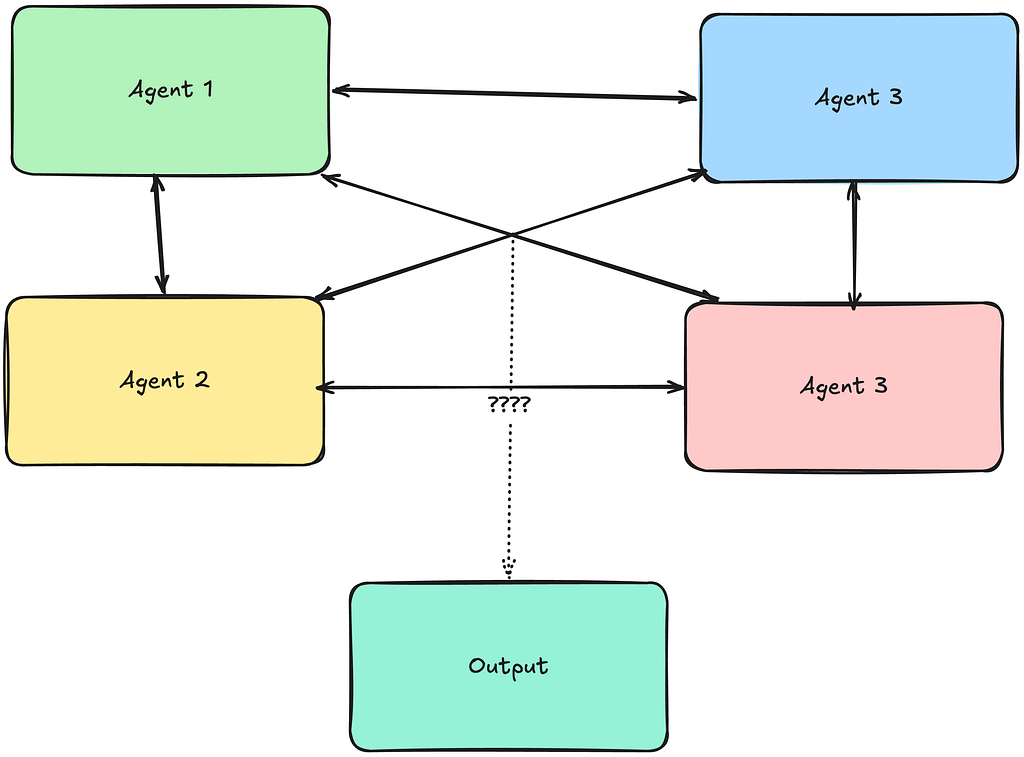
Multi-Agent Swarm — The Chaos Option
Multiple agents interacting without a strict boss. This is like a bunch of interns at a hackathon, “Show me what you got”.

Example of a Swarm:
Where it works:
- Parallel work
- Debate-style reasoning
- “Emergent intelligence”
Where it doesn’t:
- Hard to control
- Hard to debug
- Expensive way to get inconsistent answers
- A Risky approach for a business process (Could be brilliant, could break your system)
This is what happens when you take supervisor + graph and remove the adult supervision.
from strands import Agent
from strands.multiagent import Swarm

researcher = Agent(
    name="researcher",
    system_prompt="Focus on facts, constraints, and external context.",
)

builder = Agent(
    name="builder",
    system_prompt="Focus on implementation steps and delivery plan.",
)

skeptic = Agent(
    name="skeptic",
    system_prompt="Challenge assumptions, point out risks, and call out nonsense.",
)

synthesizer = Agent(
    name="synthesizer",
    system_prompt="Merge the discussion into one final concise answer.",
)

swarm = Swarm(
    [researcher, builder, skeptic, synthesizer]
)

if __name__ == "__main__":
    result = swarm(
        "Should we build an internal AI assistant for operations? "
        "Discuss value, delivery effort, and risks."
    )
    print(result)
Conclusion
You don’t pick one of these. You end up using all of them.
- A router to decide what to do
- A supervisor when things get complex
- A graph when flows stop being predictable
- And linear chains everywhere underneath
The rest are just variations, combinations, or things people created for the Youtube views.
The trick isn’t building an “agent”, it building a system for the agent to work within. Think of yourself as a consultant for McKinsey in the 80’s. A bookshelf full of books on Efficient Organisational Design and Multidivisional Form.
It’s knowing how much structure you need before things get out of hand. Because without structure, you don’t have an agent. You have vibes.